


When you hire employees in Malaysia, two mandatory contributions must be made every month: SOCSO (Social Security Organisation) and EPF (Employees Provident Fund). These statutory payments protect your employees with social security coverage and long-term retirement savings, while also keeping your company compliant with Malaysian labour laws.
For new business owners or HR staff handling payroll, navigating these contributions can seem complex. Here’s a clear guide to understanding how SOCSO and EPF work, and how modern payroll software can make the process smoother.
1. SOCSO (PERKESO) Contributions
SOCSO protects employees against work-related injuries, invalidity, and other social security risks.
Who Must Contribute?
- All Malaysian and permanent resident employees, regardless of salary.
- Employers must contribute for every eligible employee.
- Contribution rates depend on the employee’s age and salary bracket.
When to Contribute?
- Contributions are made monthly.
- Payment is due by the 15th of the following month.
How to Pay SOCSO Manually:
Without a payroll system, employers must:
- Log in to the ASSIST Portal.
- Manually key in each employee’s wages.
- Upload employee contribution details.
- Generate the contribution schedule.
- Make payment via FPX.
While this method works for small teams, it’s time-consuming and prone to errors, especially with multiple employees, salary adjustments, or overtime calculations.
2. EPF Contributions
EPF ensures employees save for retirement. Both employer and employee contribute based on statutory rates.
Who Must Contribute?
- All Malaysian employees.
- Starting October 2025, EPF contributions are also mandatory for non-Malaysian employees with valid work passes (excluding domestic household workers).
Contribution Rates:
- Malaysian employees: Typically, 11% employees + 13% employers of monthly wages.
- Foreign employees: 2% of monthly wages.
- Rates may vary depending on age or government updates.
How to Pay EPF Manually:
- Log in to i-Akaun (Employer).
- Key in wages for each employee.
- Generate the Form A contribution form.
- Make payment via FPX, cheque, or bank counter.
Manual processing becomes challenging when handling:
- Salary changes, new hires, or resignations
- Prorated salaries for mid-month joiners or leavers
- Overtime, allowances, or bonuses
- Multiple statutory categories
- Manual data entry errors
These challenges make accurate and timely payroll management difficult, even for experienced HR teams.
3. How Million Payroll Software Simplifies SOCSO & EPF Payments
A reliable payroll system like Million Payroll automates SOCSO and EPF contributions, making compliance fast, accurate, and stress-free.
Here’s how Million Payroll helps:
- Automatic Calculations: Employee and employer contributions for SOCSO and EPF are calculated instantly based on wages, age, and statutory rates.
- Accurate Deduction and Submission: Payments are recorded automatically, reducing human errors in manual entry.
- Compliance-Ready Reports: Generate LHDN-ready reports and statutory forms without extra work.
- Real-Time Updates: Any salary adjustments, new hires, or resignations are reflected immediately in contribution calculations.
- Time-Saving Automation: Free your HR team from repetitive data entry, manual checks, and multiple portal logins.
- Integrated Payroll Management: Manage salaries, statutory contributions, overtime, allowances, and bonuses all in one platform.
With Million Payroll, SMEs can ensure full compliance with SOCSO and EPF requirements while saving hours of administrative work each month. This allows businesses to focus on growth and employee engagement instead of worrying about payroll errors or missed deadlines.
Here’s how Million Payroll can help:
Automatically calculates EPF & SOCSO contributions
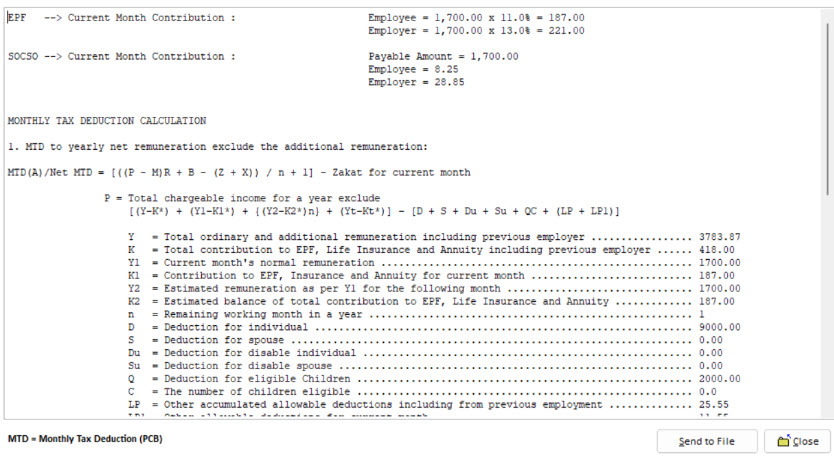
Million Payroll comes pre-loaded with the latest statutory tables for:
- EPF (KWSP)
- SOCSO (PERKESO)
- EIS
- PCB (income tax)
The system automatically calculates contributions based on employee salary, age category, and any salary changes. That means no more fumbling with spreadsheets, worrying about errors, or recalculating deductions every month. Everything is instant and accurate, even when salaries are prorated or employees join mid-month.
Generates files for upload to SOCSO & EPF portals
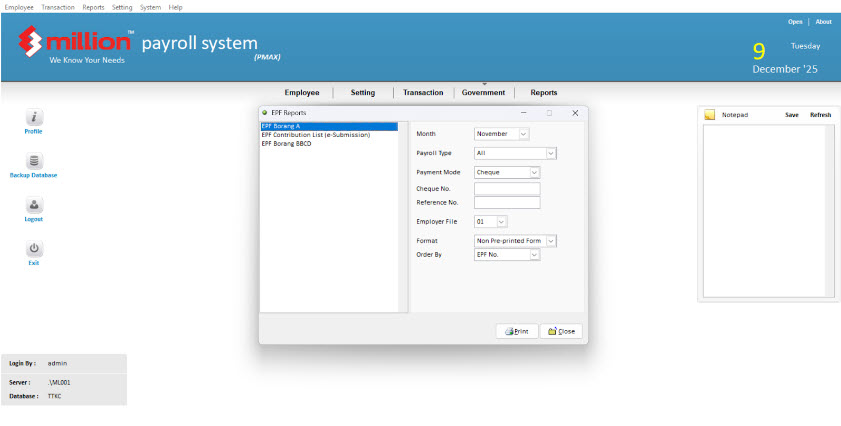
Gone are the days of manually typing in wages into multiple portals. Million Payroll can automatically generate the files you need:
- EPF Contribution File (CSV or EPF format)
- SOCSO/EIS Contribution File (ASSIST format)
All you have to do is upload these files directly to the respective portals, and you’re ready to make payments. This saves time, reduces errors, and makes compliance effortless every month
Produces Government-compliant forms & reports
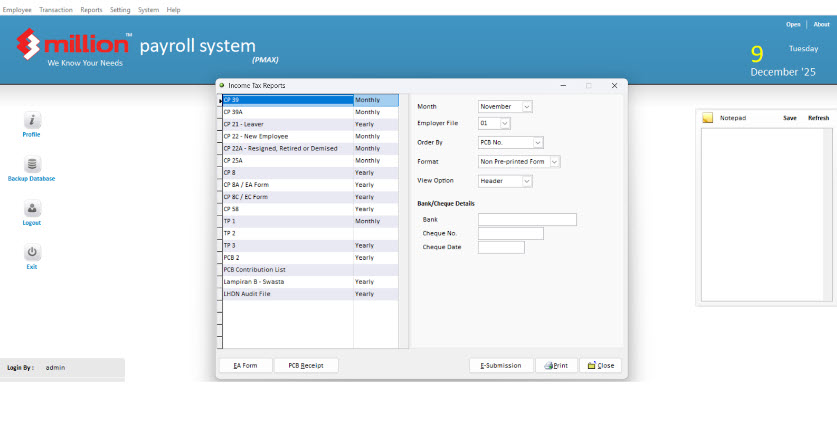
Whether it’s monthly payroll or annual submissions, Million Payroll handles it all:
- EPF Form A
- SOCSO Form 8A
- Monthly payroll reports
- Year-end forms
- Payslips (print or email to employees)
This is especially helpful during audits or when employees request historical payroll records. With just one click, you can generate everything you need—accurate, compliant, and ready to submit—without stress.
Quick Tips for Stress-Free Payroll Management
Payroll doesn’t have to be stressful. With the right practices and tools, managing SOCSO, EPF, and other statutory contributions can be smooth, accurate, and hassle-free. Here are some quick tips to keep your payroll process running efficiently:
1. Maintain an Updated Employee Database
Keep all employee information—salary, job title, join/exit dates, and statutory eligibility—up to date. This ensures that contributions for SOCSO, EPF, EIS, and PCB are calculated correctly every month and reduces errors caused by outdated or missing data.
2. Automate Notifications for Deadlines
Missing a submission or payment deadline can lead to penalties. Use payroll software that automatically reminds you of upcoming due dates for SOCSO, EPF, and tax payments. Automation keeps you on track and frees your team from manually tracking multiple deadlines.
3. Keep Historical Payroll Records Digitally
Digital records are easy to access, search, and share. Maintain digital copies of payslips, statutory forms, and contribution records. This makes audits, employee requests, and reporting far easier compared to manually filing paper documents.
4. Conduct Monthly Reconciliation to Avoid Surprises
Reconcile payroll at the end of each month to ensure all contributions, deductions, and payments match your employee records. Monthly checks catch errors early, prevent miscalculations, and make year-end reporting and audits much smoother.
5. Use Payroll Software for Automation
Using tools like Million Payroll Software can integrate all these practices:
- Automatically calculate contributions
- Generate reports and statutory forms
- Store historical payroll data securely
- Send reminders for submission deadlines
By following these tips and leveraging automation, SMEs can reduce errors, save time, and ensure compliance, making payroll management a stress-free part of running their business.
FAQs About SOCSO & EPF
Managing SOCSO and EPF can be tricky, especially for SMEs new to payroll. Here are some common questions and answers to help you stay compliant and stress-free:
1. Can I delay contributions if cash flow is tight?
No. SOCSO and EPF contributions are statutory obligations, which means they must be paid on time every month. Late payments can lead to:
- Penalties or fines from the relevant authorities
- Interest charges on delayed payments
- Compliance issues during audits
If cash flow is a concern, consider using a payroll system to schedule and track payments, ensuring you never miss a deadline.
2. What happens if I underpay SOCSO or EPF?
Underpayment is taken seriously by LHDN, SOCSO, and EPF authorities. Consequences may include:
- Penalties or late fees
- Requirement to pay the outstanding amount with interest
- Legal or audit action for repeated underpayments
Automated payroll software calculates contributions accurately based on salary and statutory rates, eliminating human errors and helping you avoid underpayment issues.
3. Are foreign employees required to contribute?
Yes—starting October 2025, foreign employees with valid work passes are required to contribute to EPF, except for domestic household workers. SOCSO contributions may also apply depending on the type of work.
A payroll system like Million Payroll automatically applies the correct contribution rates for Malaysian and foreign employees, taking into account age, salary, and statutory rules.
4. How do prorated salaries affect contributions?
If an employee joins or leaves mid-month, or receives a partial salary due to unpaid leave, contributions need to be prorated accordingly. Manual calculations can be complicated and prone to errors.
Million Payroll handles prorated salaries automatically, ensuring that:
- SOCSO and EPF contributions match the actual wages paid
- Reports and forms are accurate
- Compliance with statutory requirements is maintained
5. Can I generate past contribution records if an employee requests them?
Yes! Employees often request historical payslips or proof of contributions for SOCSO, EPF, or income tax purposes. With Million Payroll, you can:
- Access past payroll records instantly
- Reprint payslips or generate PDFs for specific months
- Produce government-compliant forms for audits or employee requests
This feature saves time and ensures accuracy and transparency, making it easier to respond to employee inquiries without digging through spreadsheets or filing cabinets.
6. What if an employee’s salary changes mid-year?
Salary changes, promotions, or bonuses can affect SOCSO and EPF contributions. Calculating these manually can be tricky, especially when adjustments apply mid-month or mid-year. Million Payroll automatically recalculates contributions based on updated salaries, ensuring compliance and accurate reporting for each pay period.
7. How do I handle audits or official inspections?
SMEs may occasionally be asked to provide SOCSO and EPF records for audits. With proper payroll software, you can:
- Generate detailed, government-compliant reports instantly
- Provide accurate documentation without sifting through physical files
- Demonstrate timely and correct contributions, reducing audit risks
Using a reliable payroll system not only simplifies day-to-day payroll management but also ensures you’re always prepared for audits or regulatory checks, keeping your business compliant and stress-free.
Conclusion
Paying SOCSO and EPF is part of running a business in Malaysia, but it doesn’t have to feel like a headache. Once you understand the basics, like who needs to contribute, how much, and when it’s due, payroll becomes a lot less intimidating.
The real game-changer? Using a smart payroll system like Million. With it, all the calculations, updates, and submissions happen automatically. No more double-checking spreadsheets, manually entering wages, or worrying about missing a deadline. Everything runs smoothly, and your employees get the protection they deserve.
With the right system, you can:
- Save time and energy on repetitive payroll tasks
- Avoid mistakes that could lead to penalties
- Keep your records neat, organized, and audit-ready
- Focus on growing your business instead of stressing over payroll
At the end of the day, managing SOCSO and EPF doesn’t have to be complicated. A little know-how plus the right tools means you can pay your employees, stay compliant, and sleep easy at night.